How to automate your invoices
Bogi finds the client email, creates the invoice, and drafts the reply. You approve before it sends.
 By Payam Fakoorziba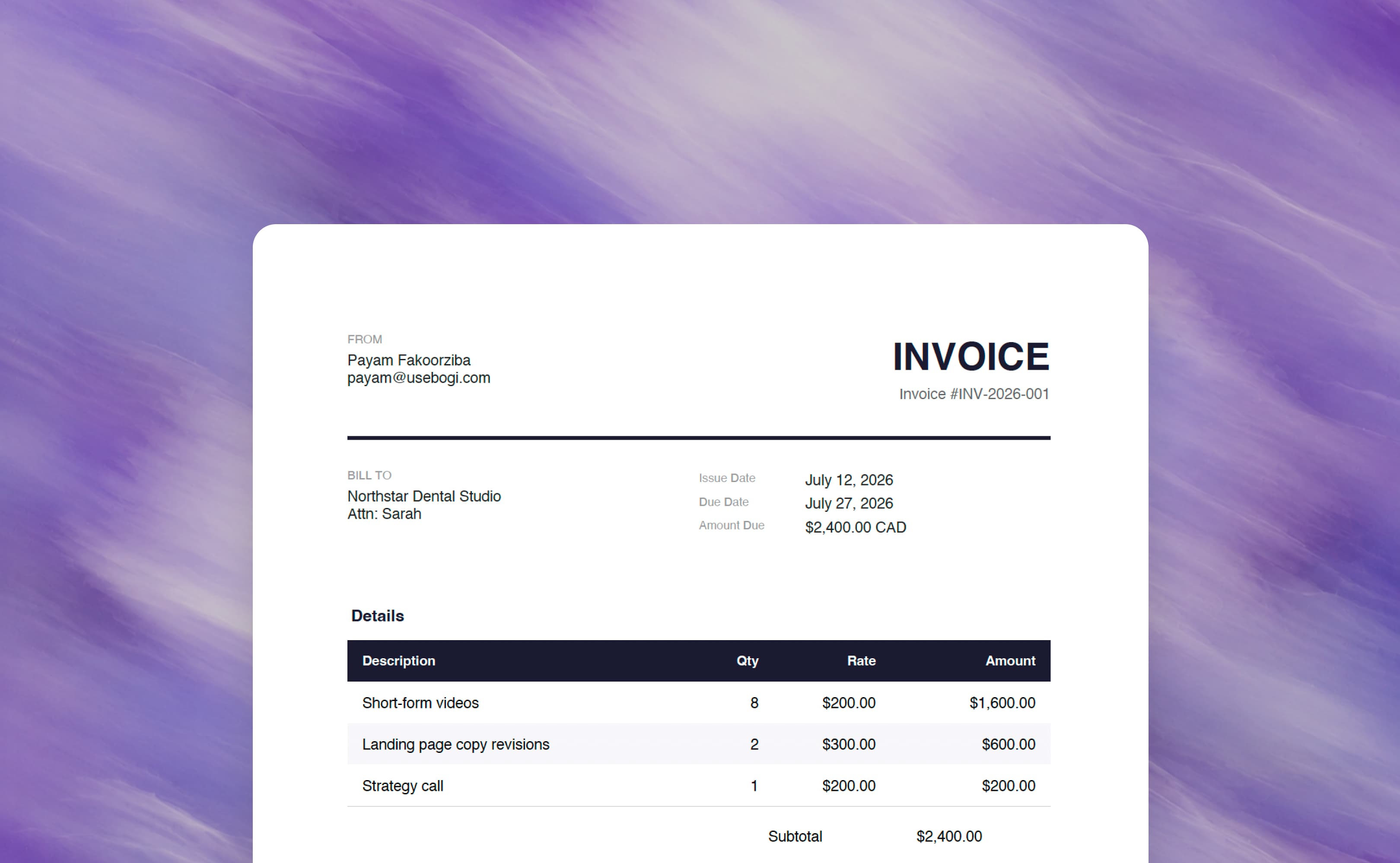
Most invoices start the same way.
A client sends you an email with the work they need billed, the company name, the amount, and sometimes even the payment timeline.
Then you still have to do the annoying part:
- find the email
- pull out the details
- format the invoice
- write the reply
- double-check everything
- send it back
With Bogi, that whole workflow can happen from one request.
Instead of manually copying details from your inbox into an invoice, you can ask Bogi to find the email, create the invoice, draft the reply, and ask you before sending it.
The example
Let's say a client sends you an email like this:
 Invoice for June content package
Hey Payam,
Thanks again for the work this month. Can you send over the invoice for the June content package?
Just to confirm, it was:
- 8 short-form videos
- 2 landing page copy revisions
- 1 strategy call
We agreed on $2,400 CAD total.
Please make it out to Northstar Dental Studio. You can send it to me here and we'll process payment this week.
Thanks,
Sarah
All the invoice details are already there. The client name, the work, the amount, and the context are sitting in your inbox.
The only thing left is turning that email into something sendable.
Ask Bogi to find the email and create the invoice
Once your Gmail is connected to Bogi, you don't need to copy and paste the email manually.
You can just ask:
Bogi can then search your inbox, find the right thread, and pull out the important details.
Bogi pulls out the important details
From the email, Bogi identifies:
- Client: Northstar Dental Studio
- Contact: Sarah
- Work completed: June content package
- Line items: 8 short-form videos, 2 landing page copy revisions, 1 strategy call
- Total: $2,400 CAD
- Payment timing: this week
Instead of you reading through the email and manually copying each detail, Bogi turns the message into structured invoice information.
Bogi creates the invoice
Next, Bogi turns those details into a clean invoice.
For example:
Bill to: Northstar Dental Studio
Service period: June content package
Payment terms: Due on receipt
Currency: CAD
| Item | Description | Amount |
|---|---|---|
| Short-form videos | 8 short-form videos | $1,600 |
| Landing page copy revisions | 2 revision rounds | $500 |
| Strategy call | 1 strategy call | $300 |
Total due: $2,400 CAD
You can review the invoice before anything gets sent.
Bogi drafts the reply too
After creating the invoice, Bogi can also draft the email back to the client.
For example:
Re: Invoice for June content packageDraft
Hey Sarah,
Thanks, I've attached the invoice for the June content package.
Total due is $2,400 CAD. Payment is due on receipt.
Let me know if you need anything else.
Best,
Payam
northstar-dental-invoice-june.pdf
Invoice #1047 · 1 page
This saves you from writing another version of the same invoice email every time.
You approve before it sends
The important part is that Bogi doesn't send it blindly.
It can prepare everything first, then ask you to confirm.
You review the invoice, check the reply, and once everything looks good, you tell Bogi to send it.
If you do this often, turn it into a routine
If invoice requests come in regularly, you can also ask Bogi to check for them on a schedule.
For example:
Bogi can suggest a routine for this. You accept it once, and then it keeps checking for you.
Invoice request check
Check the inbox for client emails asking for invoices, draft the invoice and reply, and ask for approval before sending.
Weekdays at 9:00 AM
Book a demoThat means invoice requests don't just sit in your inbox waiting for you to remember them.
Who this is useful for
This workflow is useful for anyone who sends invoices based on email conversations, especially:
- freelancers
- consultants
- agencies
- service businesses
- contractors
- creators working with clients
- small teams without dedicated admin help
If your client emails you the details, Bogi can help turn that email into finished work.
The takeaway
Your inbox already has a lot of the information you need to run your business.
Bogi helps you use that information without doing all the manual copying, formatting, and follow-up yourself.
For invoices, that means:
- Client sends an email
- Bogi finds the email
- Bogi creates the invoice
- Bogi drafts the reply
- You review and approve
- The invoice gets sent
That's the workflow.
One client email becomes a ready-to-send invoice.